More Than Golf: How a Home Simulator Doubles as Your Family’s Home Theater
Published: July 13, 2026 · Last updated: November 3, 2026
By Marcus Webb
Quick answer
A golf simulator built around a bright short-throw projector (3,000–5,000+ ANSI lumens) and a large impact screen also works as a home theater for movies, live sport and console games. Comfortable seating, a soundbar and dimmable lighting are inexpensive upgrades relative to the simulator, and they are easiest when dual use is planned from day one.
- Framing the build as a shared family and social space — not a pure golf expense — completely changes the conversation when you’re deciding on a $5,000+ purchase with a partner or family.
- Plan dual use from day one. Screen choice, projector placement, room layout, extra HDMI sources, and seating depth all become easier (and better) when movie nights, sports viewing, and team hangouts are part of the original brief.
- XS Golf did not physically test the products mentioned here. This guide synthesizes manufacturer specifications and aggregated owner and expert reporting from simulator communities. See our editorial standards.
The Conversation Every Simulator Buyer Eventually Has
At some point, almost everyone shopping for a home golf simulator has a version of the same conversation. It usually starts with a spreadsheet and ends with a partner, spouse, or family member asking a perfectly fair question:
“So we’re spending five thousand dollars… on golf?”
It’s a fair question. Framed that way, the answer feels uncomfortable. Framed accurately, though, the answer changes completely.
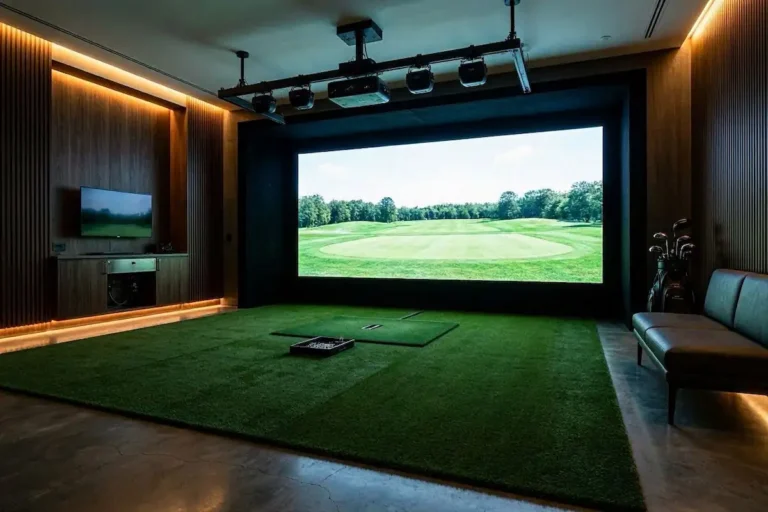
A simulator built around a bright projector and a big impact screen isn’t a golf gadget. It’s a large-format projection room that happens to be exceptionally good at golf. The same screen that shows your drive sailing down a rendered fairway on Saturday morning shows a movie on Saturday night, Champions League or NFL on Sunday, Mario Kart or party games when the kids take over, and becomes the low-pressure spot for non-formal team meetups or friend hangouts during the week.
The golf is the headline. The room is the product.
This guide is about designing for that reality on purpose — and about making the honest, non-salesy version of that case when you’re deciding on the spend as a household. Because once you see it that way, a $5,000–$8,000 investment stops looking like “golf money” and starts looking like the smartest multi-use entertainment upgrade the house will see for years.
Why the Projector Is the Hinge
The component that makes dual use possible is the projector. Golf simulation quietly pushes you toward projectors that are already excellent for everything else:
- Brightness. Simulator rooms usually aren’t blacked out — you need enough ambient light to see your ball and swing safely. That’s why every serious home simulator build guide and setup guide points buyers toward brighter units, typically in the 3,000–5,000+ ANSI lumen range depending on room light. A projector bright enough to fight ambient light in a garage is more than bright enough for a movie with the lights down (or even partially up for family viewing).
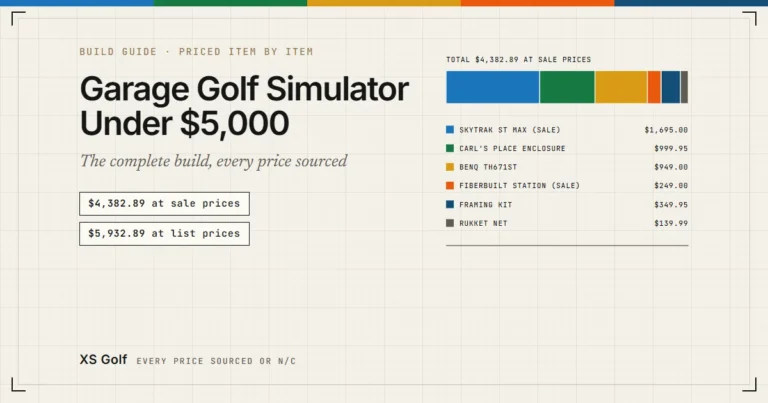
- Throw ratio. Simulator bays favor short-throw (and ultra-short-throw) projectors that can fill a 10–16 ft image from close range without casting your shadow on the screen. For film and sports, that same short throw means a huge picture in a modest room — the kind of screen size a TV can’t touch at anywhere near the price. Our $5,000 garage build guide specs a short-throw unit (0.69:1 throw ratio) precisely because it works for both centered golf practice and comfortable movie seating.
- Low input lag. Simulator software rewards projectors with a responsive game mode. That’s the exact spec console gamers look for, which is why the same projector doubles happily as a big-screen gaming rig for the whole family.
In other words: the specs golf forces you to buy are the specs a great media room wants anyway. You’re not compromising the golf build to add movie nights. The overlap is nearly total.
One honest caveat: an impact screen is not a reference-grade cinema screen. Impact screens are woven to absorb ball strikes, so you may notice some texture up close, and colors can look slightly different than on a dedicated theater screen. Owner reporting across GolfWRX, Reddit’s r/Golfsimulator, and other communities is broadly positive — for casual movie and sports viewing at normal seating distance, most people describe the picture as somewhere between “perfectly good” and “better than expected.” If you’re a home-cinema purist chasing perfect black levels and zero texture, set expectations accordingly. For everyone else, the bigger image is worth it.
The Three Cheap Upgrades That Change Everything
These are the pieces that turn a golf bay into a room people actually want to be in — and they cost a fraction of the simulator itself.
1. Seating that invites people in
A simulator bay with nothing but a hitting mat says “one person practices here.” Add a small sofa along the back wall, a pair of slim recliners, or a few quality beanbag chairs that can be tossed into a corner during practice, and the room’s identity changes instantly.
Beanbags are the sleeper pick for dual-use simulator rooms: they’re cheap, kids gravitate to them, they don’t permanently block the swing area, they stack or store easily, and they feel casual and fun. A compact loveseat or modular seating works if you have the depth — just keep all seating safely behind the hitting position and outside any possible club or ball path.
This is also where you leave room for non-golfers. When friends or colleagues drop by, nobody wants to stand the whole time.
2. Sound worth gathering around
Projector speakers are almost universally the weakest part of any projector, and simulator software doesn’t demand much audio. Movies, match days, and gaming do.
A mid-range soundbar with a wireless subwoofer (a few hundred dollars) transforms the room. A modest 3.1 or 5.1 setup goes further if you’re already wiring the space. If the room shares a wall with bedrooms, choose a soundbar with a good night/dialogue mode — or simply keep a pair of quality headphones handy for late sessions. The goal is “worth gathering around,” not “theater-reference.”
3. Lighting you can dial
Golf wants bright, even light so tracking hardware can see the ball and you can see your feet. Movies and sports want controllable darkness (or at least dimmable ambiance).
The fix is simple and cheap: put the room’s lighting on a dimmer, or use smart bulbs and scenes (“Practice,” “Movie,” “Sports”). Aim practice lighting at the mat and golfer, not the screen. Dark matte walls and blackout options help both use cases. This small detail makes switching modes feel effortless — and effortless is what keeps the room in daily use instead of becoming an expensive storage bay.
For deeper layout and lighting guidance, see our full Golf Simulator Setup Guide and Room Ideas 2026.

What the Room Actually Gets Used For
Talk to simulator owners in community forums and a clear pattern emerges: the golf gets the room built, and then the room quietly becomes one of the most-used spaces in the house. The common non-golf uses owners describe:
- Family movie nights. A 12-foot picture turns a regular Friday into an event — at zero marginal cost after the initial build.
- Live sports (and not just golf). Football, F1, basketball, boxing, Champions League, UFC — big matches on a wall-sized screen are the reason friends start inviting themselves over.
- Casual team and colleague meetups. A simulator bay is a low-pressure social venue. Non-golfers can take a few swings with nothing at stake, everyone has a place to sit, a game or match is on the big screen, and conversation flows. For remote or hybrid teams, it beats another restaurant dinner or awkward Zoom.
- Gaming. Console games (Mario Kart, racing, party titles) on a projector-sized screen are a genuine draw for kids and adults. Many simulator software packages also include closest-to-the-pin, target, and darts-style modes built for mixed-ability groups.
- Rainy-day everything. Kids’ shows, workout videos, a quiet place to watch a tournament while hitting wedges between groups, or just a comfortable second living room.
The dual-use design is what makes the cost-per-use drop fast — and cost-per-use is the number that actually matters for a shared household purchase.
Making the Case Honestly: The Household Math
Here’s the framing we’d actually use in that conversation with a partner — because it’s true, not because it’s persuasive.
A $5,000–$8,000 simulator build typically breaks down into a launch monitor (the golf-specific part) plus a projector, screen and enclosure, mat, and PC or console-class device (the parts a media room would want anyway, in some form).
If you were pricing a dedicated home theater from scratch — projector, large screen, seating, sound — you’d be spending a meaningful chunk of that budget with zero golf capability at the end of it. The simulator build gives you both rooms in one footprint.
That doesn’t make the simulator free, and it shouldn’t be sold that way across the dinner table. What it does mean is that the fair comparison isn’t “simulator vs. nothing.” It’s “simulator vs. the entertainment upgrades the household might plausibly want over the next few years anyway.”
When one purchase covers the golfer’s practice, the family’s movie nights, the friend group’s match days, rainy-day kid activities, and the occasional work social, cost-per-use drops dramatically. For the full picture of real ownership costs (subscriptions, mats, lamps, electricity, and more), read our detailed 3-year total cost of ownership guide together before committing.
Two honest cautions to include in your pitch (because your partner will think of them anyway):
- The budget number on the box is not the final number. Flooring, electrical, netting, seating, sound, and the small stuff add up. The TCO guide above is the right place to see the complete picture.
- Dual use only happens if you design for it. A bay crammed wall-to-wall with no seating depth and a screen at ankle height will stay a golf-only room. Leave depth for seating, mount the projector where it serves both a centered movie image and your hitting position, run an extra HDMI source (or a cheap HDMI switch) from day one, and treat the room as shared space.
Design Checklist for a True Dual-Use Bay
- Screen — Choose an impact screen with a reputation for picture quality, not just durability. Owner reviews usually call out which screens look best for movies (Carl’s Place and similar high-quality woven screens are frequently praised). See options in our build guide.
- Projector — Prioritize brightness for your room’s ambient light, a throw ratio that fits your depth, and a low-lag game mode. Our home simulator build guide and setup guide cover projector pairing in depth (we favor short-throw models in the 3,000–5,000+ lumen range for dual use).
- Sources — Run HDMI from your simulator PC and a spare input (streaming stick, Apple TV, game console, or Fire Stick) to the projector, or use a cheap HDMI switcher, so switching modes takes seconds, not cable surgery.
- Seating — Behind the hitting position, out of every possible ball path, easy to move or store. Beanbags and slim sofas win for flexibility.
- Sound — Soundbar minimum; small surround or soundbar + sub if you’re finishing the room anyway.
- Lighting — Dimmable (or smart scenes) for “Practice” and “Movie/Sports.” Light the mat, protect the screen.
- Safety — House rule that nobody sits or walks forward of the hitting line while clubs are out. Non-negotiable with kids or guests in the room. Clear swing arc and ball path at all times.
- Room depth — Measure swing clearance first, then allocate remaining depth to seating and circulation. See room ideas and layouts for inspiration.
FAQ
Can you really watch movies on a golf impact screen?
Yes. Impact screens are projection surfaces, and owner reporting consistently describes movie and sports viewing on them as very watchable at normal seating distance. Expect slightly more visible texture and slightly less color pop than a dedicated cinema screen — a trade most households find easy to live with given the enormous screen size.
How bright should the projector be for a dual-use room?
Buy for the golf use case, which is the more demanding one: enough brightness to hold up under the ambient light you need for safe practice. Manufacturer guidance and simulator community consensus generally point to the 3,000–5,000+ ANSI lumen range for rooms with meaningful ambient light. That brightness is more than sufficient for movies once you dim the lights. Laser projectors add longevity (no lamp replacements for years).
Does adding seating and sound compromise the golf setup?
Not if seating stays behind the hitting position and outside the swing arc. Sound systems are entirely independent of tracking hardware. The one real constraint is room depth — measure your swing clearance first, then allocate whatever depth remains to seating.
Is a simulator cheaper than building a separate home theater?
They overlap heavily. The projector, screen surface, seating, and sound serve both purposes; the launch monitor and mat are the golf-specific additions. If your household wanted a big-screen media space anyway, the incremental cost of “also a golf simulator” is far smaller than pricing the two rooms separately. Our TCO analysis and build guides help you quantify that.
What about kids and safety?
Treat the hitting area like a range: clear house rules, no one forward of the hitting line when clubs are out, soft seating that can be moved, and (if needed) protective netting. Many families make the simulator the rainy-day kids’ zone precisely because the big screen and casual seating work so well.
Sources & Method
XS Golf did not physically test the equipment discussed in this article. This guide synthesizes manufacturer specifications and aggregated owner and expert reporting from simulator community discussion (GolfWRX, r/Golfsimulator, and similar) and published buying guides. Where a claim depends on a specific product’s performance, verify it against the manufacturer’s current spec sheet before buying.
Read more about how we work on our editorial standards page.
Related Reading on XS Golf
- Golf Simulator Build Guide 2026: The $5,000 Garage Setup
- Hidden Costs & 3-Year TCO of Home Golf Simulators 2026
- Golf Simulator Setup Guide (2026): Space, Costs & Software
- Golf Simulator Room Ideas 2026: 6 Setups for Every Budget
- Best Home Golf Simulators 2026
- SkyTrak ST MAX Review 2026
- Golf Simulator & Launch Monitor FAQ
This is the conversation worth having before the build, not after. The golf is fantastic. The room becoming the place the whole household actually wants to be? That’s the real win.
— Marcus