Golf Simulator Putting Guide (2026): Launch Monitor Support, GSPro Settings & Practice Options
Published: November 7, 2026 · Last updated: November 7, 2026
Quick answer
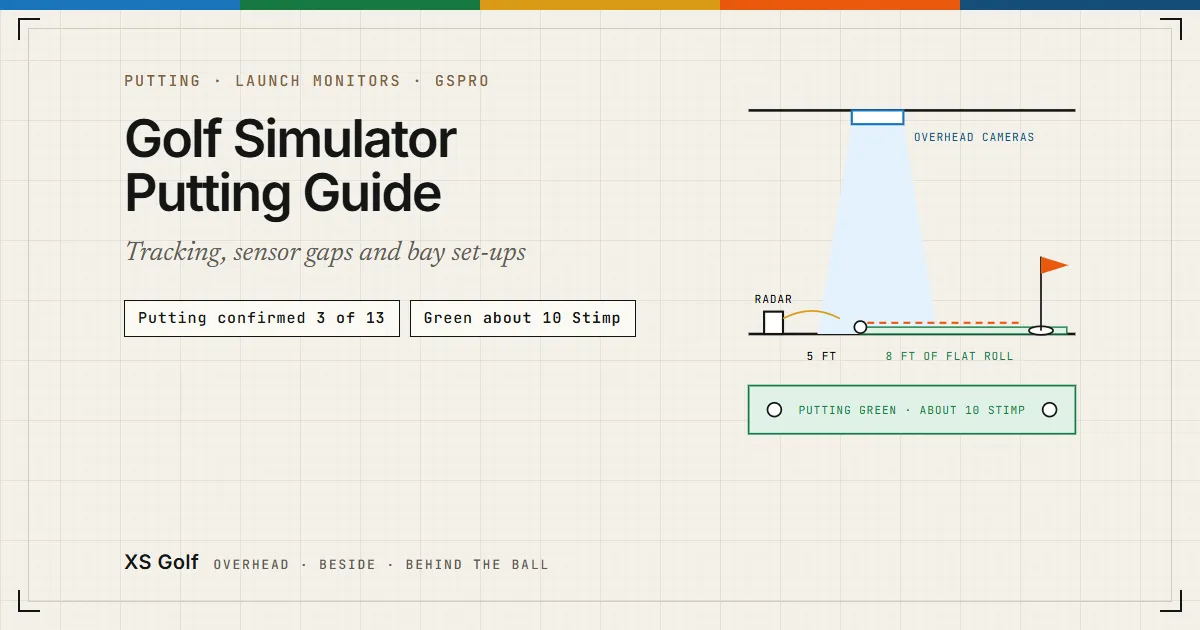
Of the 13 launch monitors in our catalog, three have putting support we could confirm: the FlightScope Mevo Gen2 (FlightScope publishes its putting set-up and data), the Garmin Approach R50 and Square Golf (both in Plugged In Golf’s reviews). For the other ten, the maker pages we read describe no putting data, so we mark them N/C rather than guess. If your monitor does not read putts, GSPro’s Gimme/Auto Putt setting lets a hole finish without one. For work on the stroke itself, a dedicated putting system such as ExPutt tracks face angle, putter direction, ball speed and path from a camera above the mat (BreakingEighty).
Where the sensor sits decides what it can see on the green: overhead, beside the ball or behind it. The table below gives the source for every row; the launch monitor comparer and cost calculator cover price and room fit.
The Shop Indoor Golf links on this page are affiliate links: XS Golf may earn a commission if you buy through them, at no extra cost to you. The other links go straight to the maker or publisher and earn no commission. See our affiliate disclosure.
XS Golf did not physically test any of these launch monitors, putting greens or putting systems. This guide is a synthesis of maker pages, GSPro’s knowledge base and the named reviews, read on 5 November 2026 and 7 November 2026.
What “putting support” means in this guide
We count a launch monitor as tracking putts only when its maker, or a named independent reviewer, says it reads a putt and names what it reports. A maker page that lists ball and club data with no mention of putting is marked N/C (not confirmed): the unit may still register some putts in some software, but nobody has published how, so we do not count it. We did not find a published accuracy test for putts on any of these units, so this guide says what each one reports, not how well.
Putting by sensor position
Overhead cameras: Uneekor EYE XO2 and Foresight Falcon
Both mount on the ceiling and look down at the hitting area, so nothing sits on the floor beside the ball. Neither maker page we read describes putting data: Uneekor’s EYE XO2 page has none, and Foresight’s Falcon comparison table has an “Essential Putting Analysis” row whose per-model values we could not read. Both are N/C for putting until the maker says otherwise. For handedness and centred tees with overhead units, see our left- and right-handed simulator guide.
Cameras beside the ball: Square Golf, Garmin R50 and others
Square Golf has a Putting Mode in Plugged In Golf’s review: you choose a distance from 5 to 50 ft and a green speed from 8 to 13, and it reports ball speed and launch direction. Plugged In Golf also found that the Garmin Approach R50 “accurately captures data from the driver through the putter”, and that Garmin’s simulator lets you set a gimme distance or turn putting off. For the Square Omni, SkyTrak ST MAX, Bushnell Launch Pro and Foresight GC3, the maker pages we read list no putting data.
Radar behind the ball: Mevo Gen2, Garmin R10, SC4 Pro and others
A radar unit behind the ball can track putts if its maker built it to: FlightScope publishes a putting set-up for the Mevo Gen2 (the unit 5 ft from the tee and at least 8 ft of flat roll) and lists launch speed, total distance and ball direction for putts (FlightScope). For a full swing, the same page asks for 7 to 9 ft from unit to tee, so the unit moves closer to putt. We found no maker statement on putting for the Garmin Approach R10, Swing Caddie SC4 Pro, Rapsodo MLM2PRO or Full Swing KIT.
| Launch monitor | Sensor position | Putting | What the source says | Source |
|---|---|---|---|---|
| Foresight Falcon | Overhead (ceiling) | N/C | N/C: Foresight’s comparison table has an “Essential Putting Analysis” row, but which models it covers could not be read from the page (5 November 2026) | Foresight |
| Uneekor EYE XO2 | Overhead (ceiling) | N/C | N/C: the maker’s product page (read 5 November 2026) describes no putting data | Uneekor |
| Garmin Approach R50 | Beside the ball | Published | Yes, per Plugged In Golf’s review: it “accurately captures data from the driver through the putter”, and Garmin’s simulator lets you set a gimme distance or turn putting off | Plugged In Golf, Jan 2025 |
| Square Golf (Home) | Beside the ball | Published | Yes, per Plugged In Golf’s review: a Putting Mode with putts from 5 to 50 ft and green speeds from 8 to 13, reporting ball speed and launch direction | Plugged In Golf, Oct 2024 |
| Bushnell Launch Pro | Beside the ball | N/C | N/C: Bushnell’s list of measured data (read 5 November 2026) has ball and club data, nothing for putts | Bushnell Golf |
| Foresight GC3 | Beside the ball | N/C | N/C: Foresight’s GC3 data list (read 5 November 2026) covers ball and club data only | Foresight |
| SkyTrak ST MAX | Beside the ball | N/C | N/C: the maker’s product page (read 5 November 2026) describes no putting data | SkyTrak |
| Square Omni | Beside the ball | N/C | N/C: the maker’s product page (read 5 November 2026) describes no putting data | Square Golf |
| FlightScope Mevo Gen2 | Behind the ball | Published | Yes, published by FlightScope: putting reports launch speed, total distance and ball direction; set the unit 5 ft from the tee with at least 8 ft of flat roll in front | FlightScope |
| Full Swing KIT | Behind the ball | N/C | N/C: Full Swing’s KIT page redirects to a regional site, and we found no readable Full Swing statement on putting | — |
| Garmin Approach R10 | Behind the ball | N/C | N/C: we found no Garmin statement on putting with the R10 | — |
| Rapsodo MLM2PRO | Behind the ball | N/C | N/C: the maker’s product page (read 5 November 2026) describes no putting data | Rapsodo |
| Swing Caddie SC4 Pro | Behind the ball | N/C | N/C: the maker’s product page (read 5 November 2026) describes no putting data | Voice Caddie |
Sensor positions come from our cost calculator’s catalog. To compare two monitors on price, room size and devices, use the comparer; for GSPro connections and 3-year costs, see our GSPro launch monitor guide.
Swipe each drawing sideways on a phone.
Mats, hitting strips and the putting surface
The hitting mats in our cost calculator are Fiberbuilt’s Grass Series Practice Station and its 4×7 Studio Mat; Shop Indoor Golf sells the SIGPRO Softy and Softy LITE as replacement hitting strips. All of these are built for full swings, and we found no green speed or putting use published for any of them, so how a putt rolls on one is N/C. Carl’s Place’s layout puts the tee 10 to 12 ft from the screen, which is where a separate putting green has to fit around the hitting area (see our impact screen guide). The cost calculator prices the mats with the rest of a build, and the launch monitor comparer shows which monitor suits your room.
For putting you need a surface that states its speed. Putting greens sold for indoor use do. Shop Indoor Golf says the SIGPRO Gimme green (Shop Indoor Golf) rolls about 10 on the Stimpmeter and measures 9 ft 10 in. × 3 ft 11 in. with two cups; it lists the Fiberbuilt 4×10 green (Shop Indoor Golf) at about 9, 10 ft × 4 ft, also with two cups.
Two layout points follow from those figures. First, a 10 ft green gives the Mevo Gen2 its 8 ft of flat roll, with the unit 5 ft behind the ball, so a putting line needs about 13 ft in all. Second, set the software’s green speed to match the turf: GSPro’s knowledge base recommends adjusting its Green Speed (Stimp) setting “until the speed of your physical putt matches the putt seen in GSPro”, and Square Golf’s Putting Mode has its own 8 to 13 setting. Our impact screen guide covers the space in front of the screen, and the room size calculator checks depth for the hitting bay.
GSPro putting settings
GSPro’s knowledge base (Play setup, Game settings and In-game interface, read 7 November 2026) documents these putting controls:
- Gimme/Auto Putt: a gimme distance to the cup (2, 4, 5, 6, 8, 10, 12, 16, 18 or 20; the page states no unit), or one of five modes: Auto-Putt Fixed, Auto-Putt Random, AutoPutt Fixed w/Chip, Pick Your Putt and Putt Out.
- Auto Putt Fixed circles (Game Settings): set the Fixed One and Two score circles to your own distances.
- Putting Assistance: semi-corrects the ball’s line so skew is no more than 2 degrees; GSPro says some launch monitors skew ball roll when putting.
- Putting Forgiveness and Putting Auto Aim: make lipping out easier or harder, and aim the putt for you.
- Breakline Indicator: an aiming stick whose white tail shows how much the green breaks.
- Green Speed (Stimp) and Green Firmness (Soft, Medium, Firm): set how the greens roll.
- Putt Grid and Putt Mode (in-game menu): show or hide the grid on the green, and switch straight to the putter.
One way to combine them: play rounds in GSPro with an auto-putt mode or a gimme distance, and practise the stroke away from the screen, for pace with a trainer such as the one in our PuttOUT review or on a green from our simulator accessories guide. GSPro runs on Windows only, and each monitor’s GSPro route and plan are in our GSPro guide.
When a dedicated putting system makes more sense
A launch monitor that reads putts reports what the ball did. A dedicated putting system looks at the stroke: in BreakingEighty’s ExPutt review the camera sits on a tripod above and in line with the mat and tracks clubface angle, putter direction, ball speed and putting path, on a mat about 44.5 × 13 in. with no physical cup. That suits face-and-path work that none of our catalog monitors publishes for putts.
Pace work needs less equipment. Our PuttOUT Pressure Putt Trainer review covers a mechanical ramp that, by its maker’s description, returns putts hit too soft or too firm; it trains pace, not line. For a weekly plan that includes the short game, see our 8-week simulator practice program.
Frequently asked questions
Do radar launch monitors track putts indoors?
It depends on the model, not on radar as such. FlightScope publishes putting for the Mevo Gen2: it reports launch speed, total distance and ball direction, with the unit 5 ft from the tee and at least 8 ft of flat roll in front of the ball. For the Garmin Approach R10, Swing Caddie SC4 Pro, Rapsodo MLM2PRO and Full Swing KIT we found no maker statement that they track putts, so check with the maker before you rely on one for putting.
How does GSPro Auto-Putt work?
In GSPro’s round setup, the Gimme/Auto Putt setting either picks a gimme distance to the cup (GSPro’s knowledge base lists 2, 4, 5, 6, 8, 10, 12, 16, 18 and 20, without stating the unit) or selects a mode: Auto-Putt Fixed, Auto-Putt Random, AutoPutt Fixed w/Chip, Pick Your Putt or Putt Out. In Game Settings you can set the Auto Putt Fixed One and Two score circles to your own distances. Putting Assistance keeps a putt’s skew to no more than 2 degrees, because GSPro says some launch monitors skew ball roll when putting.
Can you putt on a Carl’s Place or SIGPRO hitting mat?
You can roll a ball on one, but neither Carl’s Place nor Shop Indoor Golf publishes a green speed for its hitting mats, so how a putt rolls on them is not confirmed. A putting green sold for indoor use does state one: Shop Indoor Golf says its SIGPRO Gimme green rolls about 10 on the Stimpmeter and the Fiberbuilt 4×10 green about 9.
Is a dedicated putting simulator like ExPutt better than launch monitor putting?
They measure different things. In BreakingEighty’s review, ExPutt’s camera sits above the mat and tracks clubface angle, putter direction, ball speed and putting path. The launch monitors in our catalog that publish putting report ball data: launch speed, total distance and direction on the Mevo Gen2, ball speed and launch direction on Square Golf. For stroke mechanics, a dedicated system reports more; we found no independent test comparing their putting accuracy.
How we compiled this guide
XS Golf did not physically test these products. Putting support comes from each maker’s product page or, where named, Plugged In Golf’s reviews of the Square Golf (October 2024) and Garmin Approach R50 (January 2025); GSPro’s settings from its knowledge base (read 7 November 2026); ExPutt from BreakingEighty’s review (updated October 2024); green speeds and sizes from Shop Indoor Golf’s product pages, read on 5 November 2026. Where no maker or named reviewer describes putting, the row says N/C. How we work is on our Standards page.